\
TPIM toolbar:
click an icon to see more
Wizard
Planning
Timetable
Register
Seating plan
Time line
Incidents
Calendar
To Do list
Scheduler
Post-its
Contacts
Tools
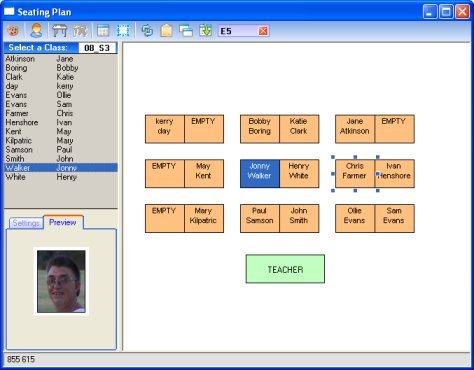
Seating Plan
The seating plan window allows you make a seating plan for each of your classes by dragging the pupil desks around to any position you like. You can then save this seating plan as a picture (bmp file) and print it. When you select a pupil from the class list on the left, the pupils desk is highlighted so that you can quickly see where the pupil sits. If you have captured picture images for the pupils in the pupil information page then their corresponding image will automatically appear when the deskt is clicked on.