TPIM
   MCQC               
   The Numbers Game 
   The Letters Game 

   10 Quick Questions 
   Wordsearch Creator 
   Crossword Creator 

   Comment Bank
   Pair Them Up!
   Matchstick Mania    
   Coordinate Pictures 
   VBA PROJECTS
   Other Utilities


Other Utilities

Copyright ©2001-2008, Chris Farmer, All Rights Reserved


Here you will find some other (small) utility programs and tools that have been developed for specific reasons. In many cases these software packages have a much wider application than that which they were created for. If you use any of these applications on a regular basis for a specific purpose other than that which they were designed for please let me know so that I can include this usage in the the software description.  All these software packages are FREE and do not require any form of registration however you are expressly forbidden from selling or otherwise distributing these packages without prior consent.


Disclaimer       If you choose to use any of this software you do so at your own risk!

I do not guarantee that this software is free from bugs and cannot be held responsible for any problems you have in using it. Having said this I would like to know of any problems you have and I am willing to help you try to solve these problems to the best of my ability. Please remember as with all ICT you should save your work on a regular basis and always make a backup.


Command line FTP uploader
This was a small project I made for someone who had an excel sheet with a chart that was constantly updated. They wanted a picture of the chart to be uploaded to their web site whenever the chart information was changed.
To do this I added 4 lines of VBA macro code to the excel sheet which saves an image of the chart as a jpg file and then calls the FTP.exe uploader to upload the image.

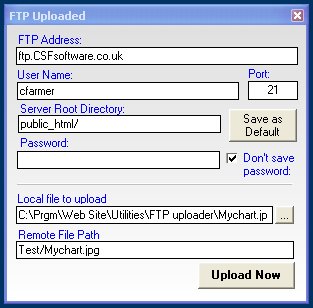
The FTP.exe uploader is a an exe file which accepts two parameters in its command line. The first parameter is the file to upload (full path required), the second parameter is the location to upload the file to (without the server root directory). Simply double clicking on the FTP.exe file without parameters allows you to setup the upload site information. You can save this information in the ini file by clicking the Save as Default button BUT it is not advisable to save your password if you are using this on a computer that gets used by others.

If you leave the password field empty the setup screen will popup (as shown) for you to enter the password prior to uploading. The password is saved in encrypted form but the encryption is not very strong at all. Tick the box to stop the password from being saved with the other data entered. If you do save the password the upload will go ahead without any further interaction assuming you have entered your File Transfer Protocol data correctly.


The download includes

1) FTP.exe - the command line FTP uploader program

2) Test Chart Upload.xls - the excel file with the chart and macros to save the chart and call the uploader.

3) MyChart.jpg - the picture of the chart created by the excel macro

4) Test.htm - the web page that contains the  embeded picture of the chart.

5) FTP.ini - The file that all the FTP settings are saved in.


 Download  FTP.zip